How to clear google search suggestions
From PCWorld.com: https://www.pcworld.com/article/2098431/how-to-erase-specific-autosuggested-urls-from-chrome-firefox-and-ie.html
To delete a single autosuggested URL, start typing the address as you normally would—Google.com in my example. Then, when the unwanted autocompletesuggestion appears, use your keyboard's arrow keys to highlight the suggestion in the drop-down menu below the address bar. Finally, press Shift-Delete and poof!
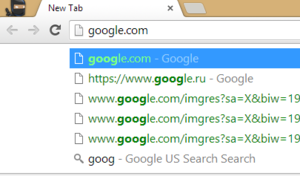
To delete a single autosuggested URL, start typing the address as you normally would—Google.com in my example. Then, when the unwanted autocompletesuggestion appears, use your keyboard's arrow keys to highlight the suggestion in the drop-down menu below the address bar. Finally, press Shift-Delete and poof!

Comments